Signs Linux Server Is Infected with a Crypto Miner
Identify indicators of Linux server cryptominer infections: sustained 100% CPU loads, hidden processes, cron backdoors, and step-by-step incident triage.
Quick answer
What to know before reading further
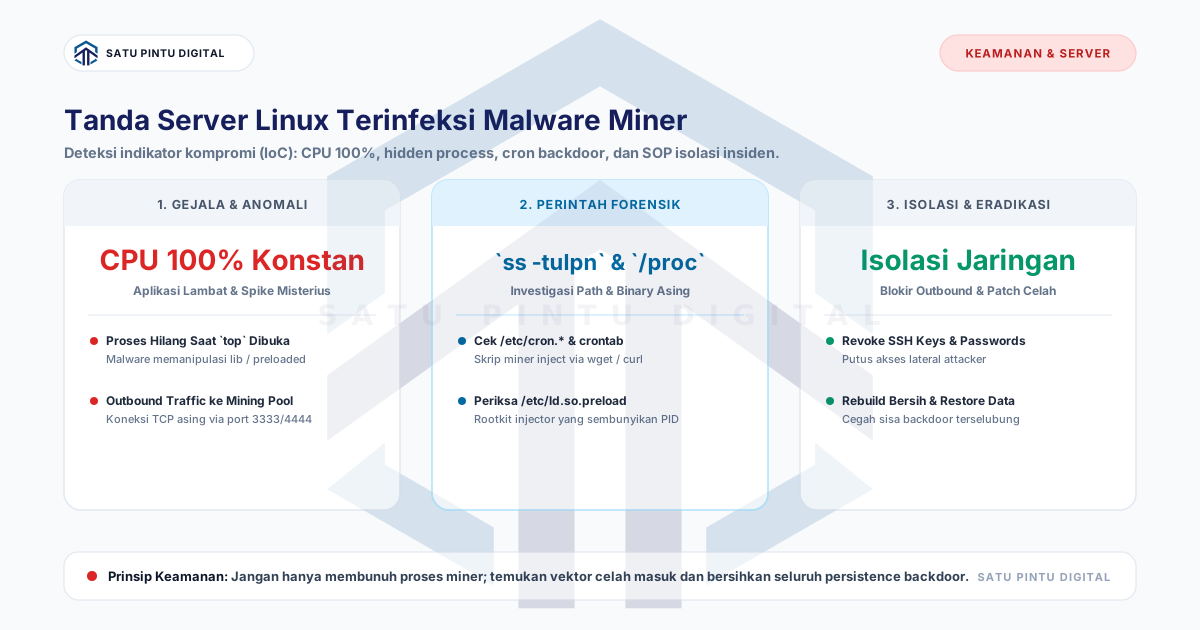
- Primary signs of a Linux server cryptominer infection include sustained 100% CPU load that drops whenever monitoring tools like 'top' are invoked, outbound TCP connections to ports 3333/4444/8080 (mining pool endpoints), rogue entries in /etc/cron.* or /var/spool/cron/, hidden executables running from /tmp or /dev/shm, and unauthorized modifications in /etc/ld.so.preload. Execute rapid triage through firewall containment, process freezing via SIGSTOP, and persistence eradication.
Process map
One examination, several checkpoints
- 01
Enforce Immediate Network Containment
Restrict ingress access strictly to authorized administrative IPs and terminate all non-essential egress communication.
- 02
Investigate Hidden Processes and Active Network Sockets
Execute `ss -tulpn`, `lsof -i`, and inspect the `/proc` virtual filesystem directly to expose illicit binary paths.
- 03
Audit Cron and Systemd Persistence Mechanisms
Inspect user crontabs, `/etc/cron.*` directories, custom systemd unit files, and verify `/etc/ld.so.preload` integrity.
- 04
Identify Initial Penetration Vectors
Analyze `/var/log/auth.log` (or `secure`) alongside web server access logs to isolate the original vulnerability exploited.
- 05
Execute Clean Rebuild and Hardening
Provision a pristine OS image from version-controlled templates, restore clean data, disable SSH passwords, and enforce fail2ban.
Sustained 100% CPU utilization without corresponding customer traffic spikes is the classic hallmark of an unauthorized cryptocurrency miner (cryptominer) operating on your Linux infrastructure. Beyond degrading application responsiveness and inflating cloud compute billing, mining infections prove that host-level system integrity has been fully compromised.
This guide details the primary Indicators of Compromise (IoC), command-line forensic procedures, and an incident triage workflow to contain and remediate infected Linux hosts.
5 Primary Indicators of Compromise (IoC)
Monitor host telemetry for the following behavioral anomalies:
+-------------------------------------------------------------------------------+
|                    5 PRIMARY CRYPTOMINER COMPROMISE INDICATORS                |
+-------------------------------------------------------------------------------+
|  1. Sustained 100% CPU : Sluggish host, load drops instantly upon opening 'top'|
|  2. Outbound Telemetry : Persistent TCP streams to ports 3333, 4444, or 8080   |
|  3. Rogue Cron Entries : Periodic 'curl ... | sh' or 'wget' in /etc/cron.*     |
|  4. Executables in RAM : Binaries running from /tmp, /var/tmp, or /dev/shm    |
|  5. Altered Preload Lib: /etc/ld.so.preload referencing third-party .so roots |
+-------------------------------------------------------------------------------+
Command-Line Forensic Investigation
When investigating suspected hosts, avoid immediate server reboots to preserve volatile memory evidence. Execute the following diagnostics:
1. Identify Suspicious Outbound Network Sockets
Inspect active TCP connections using ss or lsof to locate mining pool endpoints:
# Display all listening and established sockets with PID associations
ss -tulpn

# Filter for active outbound ESTABLISHED connections
lsof -i -P -n | grep ESTABLISHED
Examine connections targeting foreign public IPs over non-standard mining protocol ports such as 3333 (Stratum protocol), 4444, 14444, or 8080.
2. Locate Binaries Executing from Temporary and Shared Memory
Adversaries frequently execute malicious payloads from world-writable directories:
# Find active processes mapped to /tmp, /dev/shm, or /var/tmp
ls -l /proc/*/exe 2>/dev/null | grep -E '/tmp|/dev/shm|/var/tmp'
3. Check for Interception Rootkits via Preloaded Libraries
# Verify whether system library preloading has been tampered with
cat /etc/ld.so.preload 2>/dev/null || echo "ld.so.preload is clean"
If /etc/ld.so.preload contains references to files like /usr/local/lib/libprocesshider.so, an interception rootkit is actively masking miner PIDs from administrative utilities.
4. Audit Persistence Hooks: Cron and Systemd Services
# Inspect crontabs across all system user accounts
for user in $(cut -f1 -d: /etc/passwd); do
    crontab -u "$user" -l 2>/dev/null && echo "=== User Crontab: $user ==="
done

# Audit system-wide cron paths and drop-in directories
ls -la /etc/cron* /etc/crontab /var/spool/cron/crontabs/
Emergency Incident Triage Workflow
Follow this five-phase containment sequence:
+-------------------------------------------------------------------------------+
|                       INCIDENT TRIAGE CONTAINMENT WORKFLOW                    |
+-------------------------------------------------------------------------------+
|                                                                               |
|  [ 1. Network Containment ] --> Drop outbound streams; restrict admin SSH     |
|              |                                                                |
|              v                                                                |
|  [ 2. Freeze Miner Thread ] --> Issue `kill -STOP <PID>` (Do not use -9 yet)  |
|              |                                                                |
|              v                                                                |
|  [ 3. Remove Persistence  ] --> Purge malicious cron jobs & unauthorized keys |
|              |                                                                |
|              v                                                                |
|  [ 4. Export Clean Data   ] --> Extract database dumps & non-executable assets|
|              |                                                                |
|              v                                                                |
|  [ 5. Reprovision Host    ] --> Deploy pristine hardened image from scratch   |
|                                                                               |
+-------------------------------------------------------------------------------+
Phase 1: Enforce Outbound Network Containment
Prevent the miner from receiving instructions or transmitting proof-of-work hashes:
# Restrict outbound traffic to essential DNS and active SSH sessions
iptables -A OUTPUT -p tcp --dport 53 -j ACCEPT
iptables -A OUTPUT -p udp --dport 53 -j ACCEPT
iptables -A OUTPUT -m conntrack --ctstate ESTABLISHED,RELATED -j ACCEPT
iptables -P OUTPUT DROP
Phase 2: Freeze Process Threads Prior to Removal
Avoid issuing kill -9 initially, as automated watchdog daemons will instantly respawn worker processes. Freeze the execution thread first to capture binary forensics:
# Suspend execution of the target process
kill -STOP <MALICIOUS_PID>

# Inspect exact binary backing path on disk
ls -l /proc/<MALICIOUS_PID>/exe
Post-Incident Hardening Protocols
Following remediation or host reprovisioning:
- Disable Password Authentication: Enforce asymmetric Ed25519 SSH public key authentication exclusively.
- Harden Temporary Mounts: Configure
noexec,nosuid,nodevflags on/tmp,/var/tmp, and/dev/shmpartitions within/etc/fstab. - Deploy Runtime Telemetry: Install continuous host integrity monitoring daemons (e.g., Wazuh or Falco) to flag unauthorized process executions immediately.
Conclusion
A cryptominer infection signals an underlying vulnerability in your server security posture. Rapid network containment, comprehensive persistence auditing, and clean automated reprovisioning represent the industry standard for production incident resolution.
Need Managed IT & Server Architecture Solutions?
Discuss your managed server, network monitoring, and firewall needs for enterprise infrastructure.
Key terms
Quick glossary
- Cryptominer Malware
- Unauthorized software deployed onto target computing nodes to mine cryptocurrency (e.g., Monero/XMR) by monopolizing host hardware capacity.
- Indicators of Compromise (IoC)
- Forensic evidence including network IP artifacts, file checksums, and configuration anomalies confirming security breach occurrences.
- LD_PRELOAD Rootkit
- A dynamic linking manipulation technique loading malicious shared object libraries before standard libc to mask illicit processes.
- Process ID (PID)
- A unique numeric identifier assigned by the Linux kernel to each active process thread executing in system memory.
Read the sources
References and documentation
Frequently asked
Questions teams ask before implementation
- Why does CPU utilization immediately plummet to 0% when I open `top` or `htop`?
- Sophisticated mining malware monitors process tables. When administrative diagnostics like `top` are launched, the malware temporarily suspends compute threads or intercepts kernel calls to evade visual detection.
- Where do attackers commonly stage executable miner scripts?
- Attackers stage payloads in world-writable directories such as `/tmp`, `/var/tmp`, and shared memory mount `/dev/shm`, alongside hidden directories like `/root/.config/` or `/var/spool/cron/crontabs/`.
- Is deleting the detected miner binary sufficient to secure the server?
- No. Attackers implement multi-layered persistence: recurring cron downloaders, unauthorized SSH keys, rogue systemd timers, and web shells embedded in application trees. Eradicating the binary alone leaves backdoors open.
Feedback
Did this guide help you understand server architecture & uptime?
This article is part of Satu Pintu Digital's field notes. The next article covers a related topic.
Keep reading