How to Switch EHR & PACS Vendors Without Medical Data Loss
A technical guide to migrating hospital EHR and PACS databases without downtime: dual-run parallel routing, DICOM C-MOVE extraction, and data reconciliation.
Quick answer
What to know before reading further
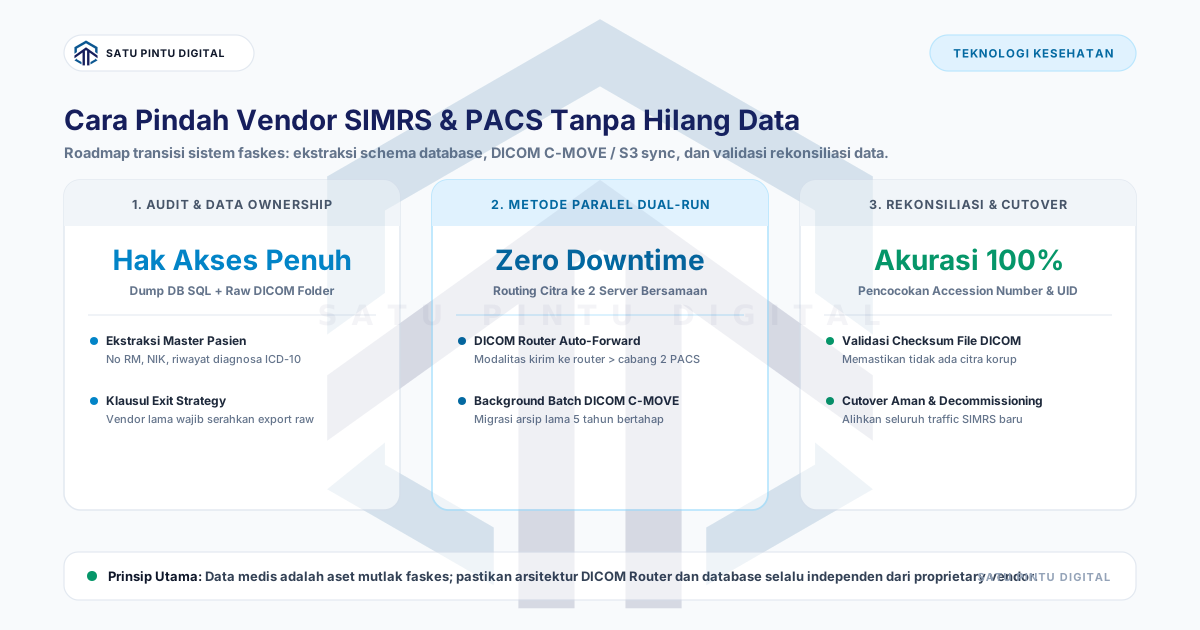
- Migrating EHR and PACS platforms between vendors without clinical data loss requires a parallel dual-run architecture: deploy an edge DICOM Router to duplicate live modality transmissions to both legacy and incoming systems simultaneously, perform scheduled batch DICOM C-MOVE extraction during off-peak hours for historical archives, and execute comprehensive patient identifier reconciliation prior to cutover.
Process map
One examination, several checkpoints
- 01
Execute Contractual Audit and Request Raw Database Dumps
Secure comprehensive administrative database dumps (PostgreSQL / SQL Server) and raw DICOM file trees under legal data ownership rights.
- 02
Deploy Edge DICOM Router for Parallel Dual-Run Operations
Configure X-ray and CT modalities to send scans to a local DICOM Router that forwards identical payloads to old and new PACS servers.
- 03
Execute Incremental Background Migration for Historical Archives
Schedule automated DICOM C-MOVE query batches during off-peak overnight windows (22:00 to 05:00) to protect LAN bandwidth.
- 04
Perform Schema Normalization and Master Patient Index Mapping
Transform legacy table schemas into target EHR data models, standardizing National ID fields and diagnostic coding structures.
- 05
Run Reconciliation Verification and Final 15-Minute Cutover
Validate a randomized cohort of 500 patient records, switch internal DNS records to the new host, and decommission the legacy instance.
Hospital directors and clinical IT leaders often remain tethered to outdated EHR and PACS platforms plagued by sluggish performance, recurring service outages, or exorbitant annual support fees. The primary barrier preventing system replacement is the perceived risk of medical data loss or disruption to live patient care.
Applying a disciplined parallel dual-run migration methodology ensures complete data preservation and seamless operational transition without clinical downtime.
4-Phase Hospital Systems Migration Framework
A structured healthcare IT transition follows four distinct operational phases:
+-------------------------------------------------------------------------------+
|                 ZERO-DOWNTIME HEALTHCARE SYSTEMS MIGRATION FRAMEWORK          |
+-------------------------------------------------------------------------------+
|  PHASE 1: Data Audit & Ownership Assertion (Schema Mapping & Legal Clearance) |
|                               |                                               |
|                               v                                               |
|  PHASE 2: Edge DICOM Router Deployment & Dual-Run Operations (Live Parity)    |
|                               |                                               |
|                               v                                               |
|  PHASE 3: Incremental Historical Archive Extraction (Off-Peak Batch Sync)     |
|                               |                                               |
|                               v                                               |
|  PHASE 4: Master Patient Index Reconciliation & Final DNS Cutover (15 Min)    |
+-------------------------------------------------------------------------------+
The Dual-Run Topology with Edge DICOM Routing
The foundational mechanism of zero-downtime PACS migration is positioning an independent Smart DICOM Router between clinical imaging modalities and storage destinations.
                    +--------------------------------+
                    | Diagnostic Modalities (DR/CT)  |
                    +--------------------------------+
                                   |
                                   v (DICOM C-STORE)
                    +--------------------------------+
                    |       Edge DICOM Router        |
                    +--------------------------------+
                            /                \
      (Stream A - Active)  /                  \  (Stream B - Verification)
                          v                    v
              +---------------------+  +---------------------+
              | Legacy PACS Archive |  | Target PACS Server  |
              | (Active Clinical)   |  | (Validation Node)   |
              +---------------------+  +---------------------+
In this architecture, radiographers maintain standard acquisition habits. Modalities push image studies to the edge router, which transparently duplicates the payload to both the legacy PACS (ensuring uninterrupted diagnostic reporting) and the incoming PACS (allowing systematic performance validation).
Historical DICOM Archive Extraction Pipeline
To migrate 5 to 10 years of historical imaging data without saturating clinical network bandwidth, execute automated overnight DICOM C-MOVE batches during off-peak hours (22:00–05:00):
#!/usr/bin/env bash
# /opt/scripts/migrate-historical-pacs.sh
set -euo pipefail

LEGACY_AET="OLD_PACS_ARCHIVE"
LEGACY_IP="192.168.1.50"
LEGACY_PORT="104"
TARGET_AET="NEW_PACS_STORE"

# Execute monthly date-range query batches to prevent buffer exhaustion
START_DATE="20210101"
END_DATE="20210131"

echo "[$(date)] Initiating DICOM migration batch for date range ${START_DATE} to ${END_DATE}..."

# Utilize dcmtk movescu utility
movescu -v -aet "MIGRATION_WORKER" \
        -aec "${LEGACY_AET}" \
        -aem "${TARGET_AET}" \
        -k "0008,0052=STUDY" \
        -k "0008,0020=${START_DATE}-${END_DATE}" \
        "${LEGACY_IP}" "${LEGACY_PORT}"

echo "[$(date)] Batch migration completed successfully."
Pre-Cutover Data Reconciliation Matrix
Prior to decommissioning legacy infrastructure, informatics engineers must verify data integrity against a strict reconciliation matrix:
| Validation Entity | Verification Parameters | Permitted Error Margin |
|---|---|---|
| Master Patient Index | Patient ID, National Identification, Full Name, DOB | 0% (100% Strict Match) |
| Diagnostic Encounters | Encounter Timestamp, Attending Physician, ICD-10 Code | 0% (100% Strict Match) |
| PACS Study Relations | Accession Number, Study Instance UID, Series/Instance Count | 0% (100% Strict Match) |
| Binary File Integrity | SHA-256 Checksums across a randomized 500-study cohort | 0% (Bit-Identical Check) |
Final Production Cutover Protocol (15–30 Minutes)
- Schedule Maintenance Window: Execute during the lowest-volume operational shift change (23:30–00:00).
- Lock Legacy Database: Transition the legacy EHR database to
READ ONLYmode to prevent split-brain records. - Capture Delta Transactions: Export any final transactions generated during the current operational day.
- Update Internal DNS Routing: Repoint
ehr.hospital.localandpacs.hospital.localDNS records to the new host IP. - Conduct End-to-End Validation: Process a single test encounter through registration, outpatient triage, billing, and radiology acquisition.
- Authorize Go-Live: Formalize the new platform as the active production environment.
Conclusion
Transitioning hospital EHR and PACS systems does not require clinical downtime or risk data loss when managed through modular architecture and parallel dual-run routing. Healthcare organizations maintain sovereign ownership of their clinical data; legacy systems must never impede operational agility.
Need Assistance with SATUSEHAT & PACS Integration?
Consult your PACS architecture, smart DICOM router, and SATUSEHAT compliance with our engineering team.
Key terms
Quick glossary
- Vendor Lock-In
- A state of organizational dependency where transitioning away from a technology supplier is impeded by proprietary data formats and closed APIs.
- DICOM C-MOVE
- A standardized DICOM network service enabling an initiating node to instruct a source archive to transfer imaging studies to a destination AE title.
- Dual-Run Mode
- An operational migration window during which both the outgoing and incoming systems operate concurrently to validate data parity.
- Accession Number
- A unique operational identifier generated by an EHR/RIS order to correlate clinical requisitions with acquired PACS imaging studies.
Read the sources
References and documentation
Frequently asked
Questions teams ask before implementation
- What should hospital leadership do if a legacy EHR vendor refuses to provide raw data exports?
- Healthcare regulations and data privacy statutes establish that clinical records remain the legal property of the healthcare provider and patient. If a vendor resists, invoke contractual audit provisions, escalate to regulatory oversight bodies, or extract records via existing FHIR/REST API endpoints.
- How long does it take to migrate a 5-year historical DICOM image archive?
- For an institutional archive spanning 2 to 5 TB (approximately 50,000 to 100,000 imaging studies), an automated overnight DICOM C-MOVE pipeline over a gigabit LAN typically completes migration within 3 to 7 business days.
- Must hospital outpatient operations pause during final system cutover?
- No. With edge DICOM routing active, clinical staff continue routine diagnostic workflows uninterrupted. The final production cutover requires only a brief 15-to-30-minute maintenance window scheduled during a night shift change.
Feedback
Did this guide help you understand PACS implementation & workflow?
Transmit Radiology to SATUSEHAT Without the Setup Hassle
Connect your clinical imaging workflow—from modality worklists and automated accession numbers to web DICOM viewing and SATUSEHAT synchronization. Free Tier available for clinics and hospitals.
Keep reading