Linux Bare-Metal Server Backup SOP & Rapid Disaster Recovery
Enterprise Standard Operating Procedures for Linux bare-metal server backups: block-level imaging, LVM snapshots, PXE rescue boot, and rapid RTO recovery.
Quick answer
What to know before reading further
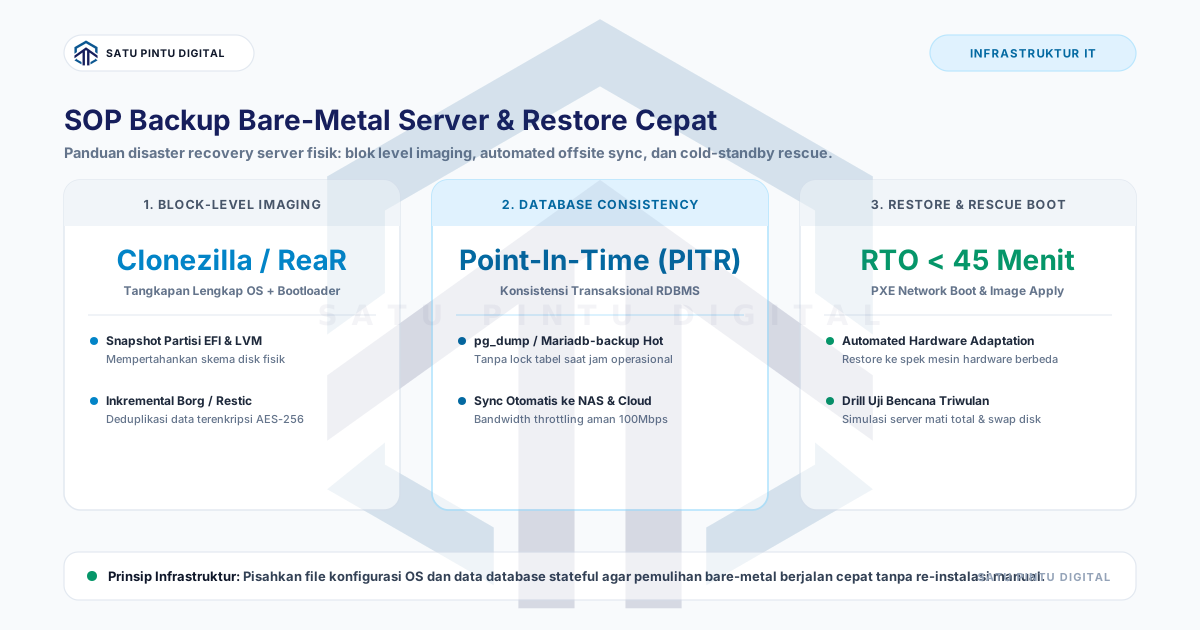
- A Linux bare-metal backup SOP decouples the operating system state (block-level rescue image via ReaR) from dynamic application data (atomic LVM snapshots and transactional DB dumps). Backups reside on a local NAS and replicate offsite to an immutable cloud repository. Following complete hardware failure, recovery is executed via PXE network boot or rescue USB to re-image storage volumes, achieving an RTO under 45 minutes.
Process map
One examination, several checkpoints
- 01
Document Disk Partition Layouts and LVM Topologies
Record physical storage GUID partition tables, LVM volume groups, and filesystem UUIDs using `lsblk -f` and `fdisk -l`.
- 02
Configure ReaR for Automated System Recovery Media
Tune `/etc/rear/local.conf` to generate bootable rescue ISO images dispatched automatically to centralized NFS/NAS stores.
- 03
Deploy Scheduled LVM Storage Snapshots and Database Dumps
Capture point-in-time LVM snapshots prior to database extraction to ensure transactional consistency across stateful tiers.
- 04
Stream Deduplicated Offsite Archives with Borg
Replicate encrypted incremental repositories to remote cloud storage utilizing authenticated AES-256 and Zstandard compression.
- 05
Execute Quarterly PXE Network Recovery Simulations
Boot cold-standby hardware via network rescue images, apply filesystem snapshots, and verify production systemd daemon states.
Managing dedicated physical bare-metal servers for high-throughput transactional databases or high-performance compute requires an enterprise-grade disaster recovery posture. When a motherboard fails, a RAID controller corrupts, or storage buses degrade, engineering teams cannot afford hours manually reinstalling operating system packages and reconfiguring kernel parameters.
This guide provides an actionable Standard Operating Procedure (SOP) for Linux bare-metal server backups, engineered to achieve a Recovery Time Objective (RTO) of under 45 minutes.
Decoupling System State from Application Data
A common architectural flaw is bundling the static operating system and dynamic transactional data into a single monolithic backup job. A verified bare-metal strategy decouples these concerns into two distinct execution paths:
+-------------------------------------------------------------------------------+
|                   BARE-METAL SERVER BACKUP ARCHITECTURE                       |
+-------------------------------------------------------------------------------+
|                                                                               |
|  [ PRODUCTION BARE-METAL SERVER ]                                             |
|         |                                                                     |
|         +---> PATH 1: OS State & Configuration (ReaR / Block Level)           |
|         |     - UEFI Bootloader, Root Partition /, /etc, Network Definitions  |
|         |     - Output: Bootable Rescue ISO + System Tar Archive              |
|         |     - Frequency: Weekly / On Configuration Changes                  |
|         |                                                                     |
|         +---> PATH 2: Stateful Application Tier (LVM Snapshot & DB Dumps)     |
|               - Relational Database (/var/lib/postgresql) & File Stores       |
|               - Output: Incremental Deduplicated Borg Repositories            |
|               - Frequency: Daily / Every 4 Hours                              |
|                                                                               |
|         v                                                                     |
|  [ STORAGE REPOSITORY: Local High-Throughput NFS/NAS + Offsite Cloud Vault ]  |
|                                                                               |
+-------------------------------------------------------------------------------+
Implementing Relax-and-Recover (ReaR)
Relax-and-Recover (ReaR) generates standalone bootable environments capable of re-partitioning raw hardware and restoring filesystems automatically.
1. Installation & Configuration (/etc/rear/local.conf)
# Install core packages on Debian/Ubuntu systems
apt-get install -y rear binutils isolinux syslinux-common

# Define the ReaR disaster recovery configuration
cat << 'EOF' > /etc/rear/local.conf
OUTPUT=ISO
OUTPUT_URL=nfs://192.168.10.100/mnt/backup/rear-iso
BACKUP=NETFS
BACKUP_URL=nfs://192.168.10.100/mnt/backup/rear-data
BACKUP_PROG_EXCLUDE=( '/tmp/*' '/var/tmp/*' '/var/lib/postgresql/*' '/mnt/*' )
REQUIRED_PROGS=( "${REQUIRED_PROGS[@]}" btrfs gdisk )
EOF
2. Executing the Rescue Media & System Image Generation
# Generate the bootable recovery ISO and system archive
rear -v mkbackup
This command outputs a self-contained ISO containing the active kernel, modular device drivers, storage mappings, and network scripts required to reconstitute the physical server.
Consistent Database Backups via Atomic LVM Snapshots
For high-volume database engines, leverage Logical Volume Manager (LVM) snapshots to capture point-in-time state without database table locking:
#!/usr/bin/env bash
# /opt/scripts/backup-db-lvm.sh
set -euo pipefail

# 1. Place database in transactional backup mode
psql -U postgres -c "SELECT pg_backup_start('LVM_SNAPSHOT_BACKUP');"

# 2. Create the instantaneous LVM storage snapshot (1-2 seconds execution)
lvcreate -L 20G -s -n pg_snap /dev/vg_system/lv_postgres

# 3. Release the database transactional lock
psql -U postgres -c "SELECT pg_backup_stop();"

# 4. Mount the read-only snapshot volume and stream to deduplicated archive
mkdir -p /mnt/snapshot
mount -o ro /dev/vg_system/pg_snap /mnt/snapshot
borg create /mnt/nas-backup/borg::"{now}" /mnt/snapshot

# 5. Unmount and delete the temporary LVM snapshot
umount /mnt/snapshot
lvremove -y /dev/vg_system/pg_snap
echo "[$(date)] Consistent LVM database backup successfully archived."
Disaster Recovery Runbook: Bare-Metal Restore
When hardware failure strikes and a replacement chassis is mounted in the rack:
+-------------------------------------------------------------------------------+
|               BARE-METAL RESTORATION RUNBOOK (RTO < 45 MINUTES)               |
+-------------------------------------------------------------------------------+
|  1. Boot Target Node : Attach ReaR Rescue USB or initiate PXE network boot    |
|  2. Console Menu     : Select 'Recover [hostname]' on the bootstrap screen    |
|  3. Disk Partitioning: ReaR reconstructs GPT partition maps and LVM layouts   |
|  4. Filesystem Apply : ReaR extracts OS binaries, kernel configs, and drivers |
|  5. Initial Reboot   : Remove rescue media and reboot into the live OS        |
|  6. Database Hydrate : Pull the latest Borg snapshot to /var/lib/postgresql   |
|  7. Service Verify   : Confirm `systemctl status postgresql` & app endpoints  |
+-------------------------------------------------------------------------------+
Conclusion
Bare-metal infrastructure demands uncompromising recovery discipline. By pairing OS-level ReaR rescue generation with atomic LVM application snapshots, enterprise engineering teams transform severe physical hardware disasters into predictable, rapid restoration procedures.
Need Managed IT & Server Architecture Solutions?
Discuss your managed server, network monitoring, and firewall needs for enterprise infrastructure.
Key terms
Quick glossary
- Bare-Metal Server
- A dedicated physical computer server executing an operating system and application workloads directly on hardware without a hypervisor layer.
- Relax-and-Recover (ReaR)
- An open-source bare-metal disaster recovery framework for Linux that creates bootable rescue media and automates partition reconstruction.
- Logical Volume Manager (LVM)
- A storage virtualization architecture in Linux facilitating dynamic volume resizing, disk aggregation, and atomic storage snapshots.
- Preboot Execution Environment (PXE)
- An industry computing standard enabling hardware systems to boot operating system images over a network interface without local media.
Read the sources
References and documentation
Frequently asked
Questions teams ask before implementation
- Why are standard utilities like Rsync or Tar inadequate for bare-metal server recovery?
- Rsync and Tar copy individual files but fail to capture EFI boot sectors, GPT partition headers, extended filesystem attributes (xattr), and SELinux security labels atomically, frequently causing boot-loop failures on fresh hardware.
- Can a bare-metal image restore onto replacement hardware with different CPU or motherboard specs?
- Yes, when utilizing modern Linux kernels paired with frameworks like ReaR. The kernel dynamically loads required hardware modules, while ReaR automatically remaps network interface names (NICs) and storage controller UUIDs during the restore cycle.
- How long does it take to restore a 1 TB production bare-metal server?
- Over a 10 Gbps data center network or direct NVMe storage bus, transferring 1 TB of compressed block data takes approximately 15 to 25 minutes, with an additional 10 minutes required for bootloader initialization and service checks.
Feedback
Did this guide help you understand server architecture & uptime?
This article is part of Satu Pintu Digital's field notes. The next article covers a related topic.
Keep reading