Cost-Effective RMM Software & Office Server Monitoring Guide
A guide to selecting cost-effective RMM software for office servers: open-source vs commercial solutions, automated patch management, and license savings.
Quick answer
What to know before reading further
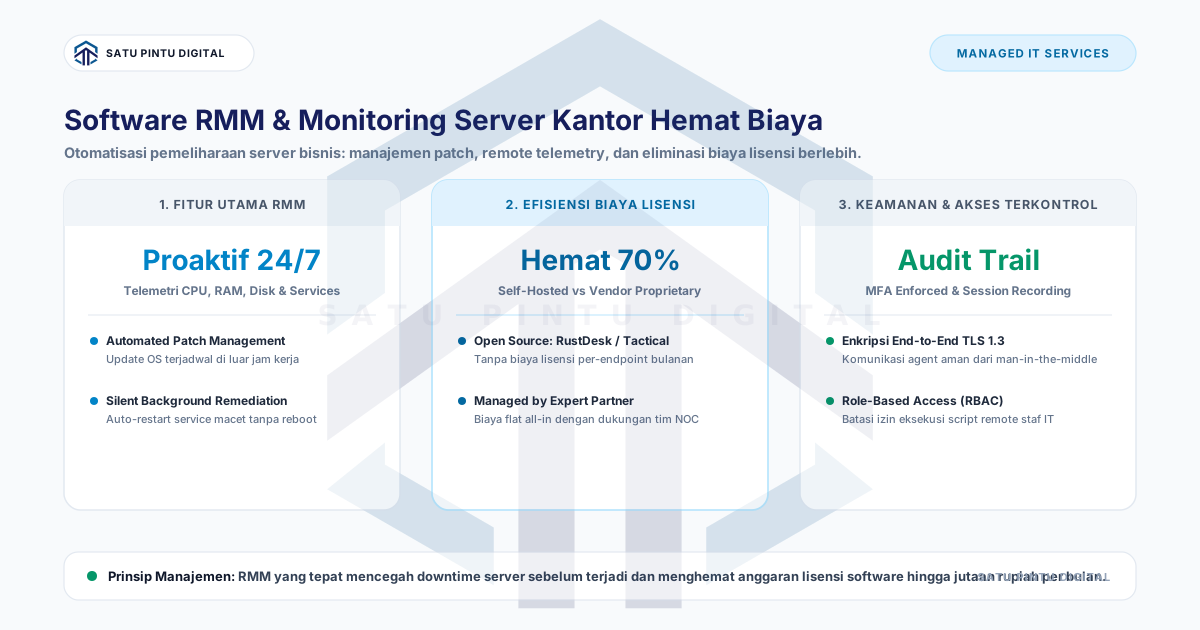
- Cost-effective RMM software for office infrastructure pairs self-hosted open-source platforms (such as Tactical RMM, RustDesk, or Prometheus/Grafana) to eliminate expensive per-endpoint vendor licensing ($3–$8/node/month). Modern RMM architectures provide real-time hardware telemetry, off-hours OS patch automation, encrypted remote terminal access, and automated daemon remediation to prevent operational server downtime.
Process map
One examination, several checkpoints
- 01
Audit Server and Workstation Inventory
Map all physical hosts, hypervisors, NAS units, and office workstations requiring continuous operational telemetry.
- 02
Evaluate Essential RMM Operational Requirements
Prioritize hardware alerting (CPU/RAM/Disk), automated patch pipelines, encrypted remote shell access, or software inventory tracking.
- 03
Select Delivery Framework: Self-Hosted vs Managed MSP
Weigh internal engineering maintenance hours against a predictable all-inclusive managed services agreement.
- 04
Deploy Lightweight Monitoring Agents and Alert Thresholds
Install telemetry agents across Linux and Windows hosts, setting actionable alerting limits (e.g., storage > 85%, CPU > 90% over 5 min).
- 05
Configure Maintenance Schedules and Automated Remediation
Schedule automated weekend OS patch installations and script-driven daemon auto-restarts for hung services.
Many growing organizations manage internal servers using an outdated “break-fix” mentality. When a central file repository crashes mid-day or an ERP database freezes due to an exhausted disk partition, operational productivity halts across the entire office.
Implementing a modern Remote Monitoring and Management (RMM) platform transitions IT operations from reactive crisis management to proactive stability. This guide evaluates how to deploy a cost-effective, secure RMM architecture for office servers.
Why Office Servers Require Continuous RMM Telemetry
RMM replaces reactive triage with automated operational governance:
+-------------------------------------------------------------------------------+
|                       BREAK-FIX VS PROACTIVE RMM WORKFLOWS                    |
+-------------------------------------------------------------------------------+
|  Traditional Model (Break-Fix):                                               |
|  Server Crashes --> Employees Complain --> IT Investigates --> Hours of Outage|
|                                                                               |
|  Modern Model (Proactive RMM):                                                |
|  Disk Hits 85% --> RMM Alert Triggers Auto-Purge --> Zero Incident Downtime   |
+-------------------------------------------------------------------------------+
4 Core Capabilities of Cost-Effective RMM
1. Real-Time Hardware & Service Telemetry
RMM agents continuously monitor CPU load, memory utilization, disk partition capacity, thermals, and critical background daemons (e.g., PostgreSQL, Active Directory, Nginx, Docker). Automated alerts dispatch immediately via Telegram, webhooks, or email when thresholds are breached.
2. Scheduled Automated Patch Management
Unpatched operating systems represent the primary vector for internal ransomware propagation. RMM automates security patch staging and installation during weekend maintenance windows (e.g., 02:00 Sunday), verifying host stability and executing reboots automatically.
3. Silent Remote Terminal Access
Engineers can execute PowerShell or Bash scripts directly through an encrypted management console without interrupting active office workers or requiring interactive desktop takeover sessions.
4. Automated Service Remediation
When a critical database daemon stops responding, RMM triggers scripted self-healing routines (such as executing systemctl restart service_name) while logging the incident for review.
Comparative Matrix: Commercial vs Open-Source vs Managed MSP
Review total operating cost structures for an office operating 5 Servers and 45 Workstations (50 Endpoints):
| Evaluation Metric | Commercial Proprietary RMM (NinjaOne/Datto) | Self-Hosted Open-Source (Tactical RMM) | Managed IT Partner (External MSP) |
|---|---|---|---|
| Endpoint License Fees | $300 / month ($6/node) | $0 (Open-Source Core) | Included in Retainer |
| Hosting Infrastructure | $0 (Vendor SaaS) | $30 / month (Cloud VPS) | Included (Vendor Managed) |
| Engineering Time Overhead | Moderate | High (Maintenance required) | $0 (Managed by Experts) |
| Automated Patch Pipeline | Fully Automated | Configurable via Scripts | Managed & Verified |
| 24/7 Incident Response SLA | Ticket Queue (Business Hours) | None (Internal Team Only) | Rapid SLA (< 15 Minutes) |
| TOTAL ESTIMATED COST | $300 / month | $30 / month + Staff Overhead | $250 / month (All-Inclusive) |
Recommended Self-Hosted Open-Source Architecture
For organizations with experienced internal systems engineers, the following open-source architecture delivers robust functionality without recurring license bloat:
+-------------------------------------------------------------------------------+
|                   RECOMMENDED OPEN-SOURCE RMM ARCHITECTURE                    |
+-------------------------------------------------------------------------------+
|  1. RMM & Remote Scripting : Tactical RMM (Golang + Django + MeshCentral)     |
|  2. Encrypted Remote Relay : RustDesk Server (Self-Hosted Screen Control)     |
|  3. Metric Telemetry Engine: Prometheus + Node Exporter + Grafana Analytics   |
|  4. Incident Alerting Node : Alertmanager integrated with Telegram/Slack API  |
+-------------------------------------------------------------------------------+
Conclusion
Operating office server infrastructure without continuous RMM monitoring introduces unacceptable operational fragility. Enterprises can either deploy self-hosted open-source monitoring frameworks internally or engage an established Managed IT Services partner to secure 24/7 proactive stability at a fraction of commercial licensing costs.
Need Managed IT & Server Architecture Solutions?
Discuss your managed server, network monitoring, and firewall needs for enterprise infrastructure.
Key terms
Quick glossary
- Remote Monitoring and Management (RMM)
- An IT software platform enabling administrators to monitor hardware health, execute administrative scripts, and distribute software updates remotely.
- Auto-Remediation
- An automated observability capability where predefined scripts execute in response to specific error states without human intervention.
- Patch Management
- The systematic acquisition, testing, and deployment of software and OS security updates to resolve known vulnerabilities.
- Silent Background Remediation
- Resolving underlying operating system and service faults via background processes without interfering with the active user interface.
Read the sources
References and documentation
Frequently asked
Questions teams ask before implementation
- What is the primary difference between RMM software and screen-sharing tools like TeamViewer?
- Screen-sharing tools merely project the visual desktop when an issue occurs. RMM operates continuously in the background 24/7, tracking hardware health, applying patches, executing automation scripts, and sending alerts before system failure strikes.
- What are the typical commercial licensing costs for proprietary RMM platforms?
- Commercial vendors (e.g., NinjaOne, N-able, Datto) charge between $3 and $8 per endpoint monthly, frequently requiring 50-to-100-device minimum contract commitments and onboarding fees.
- Are open-source RMM solutions secure enough for corporate office infrastructure?
- Yes, when hosted on properly hardened infrastructure featuring TLS encryption, Multi-Factor Authentication (MFA), strict firewall IP filtering, and regular core updates.
Feedback
Did this guide help you understand server architecture & uptime?
This article is part of Satu Pintu Digital's field notes. The next article covers a related topic.
Keep reading