When Must Clinics Adopt PACS? Volume & ROI Guide
Quantitative examination volume thresholds for clinic PACS adoption, practical ROI formulas, and the financial transition from physical film to cloud PACS.
Quick answer
What to know before reading further
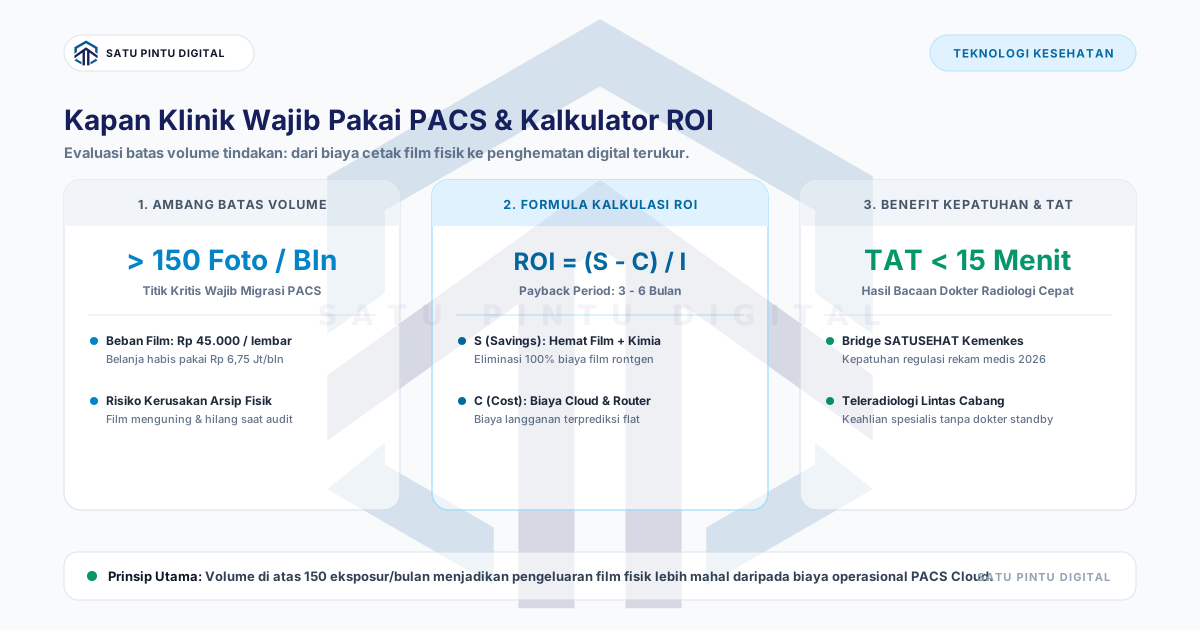
- Clinics should adopt a PACS once diagnostic radiology volume exceeds 150 examinations per month. At this threshold, monthly expenses on physical films, chemical reagents, and printer maintenance ($750–$1,100/month) exceed modern cloud PACS subscription costs like Imagestro Professional tier ($185/month billed annually for up to 500 orders). Payback periods typically resolve starting from month 4 of operation.
Process map
One examination, several checkpoints
- 01
Audit Monthly Examination Volume and Consumable Spend
Tally physical film sheets purchased, chemical developer costs, and dry-view printer service contracts over the past 6 months.
- 02
Calculate True Cost per Examination
Determine baseline operational spend per exposure, typically ranging from $2.50 to $4.00 per conventional film sheet.
- 03
Model Cloud PACS Subscription Tiers
Select an appropriate cloud storage tier and local DICOM router footprint matched to clinical growth projections.
- 04
Compute Break-Even and Payback Period
Evaluate monthly operational savings against initial setup costs to establish the precise break-even timeline.
- 05
Deploy Local DICOM Router and Verify Telemetry
Install an energy-efficient edge mini-PC in the radiology suite connected to encrypted cloud endpoints.
Clinic owners and outpatient facility directors often postpone radiology digitization under the assumption that Picture Archiving and Communication Systems (PACS) are designed exclusively for large hospital networks. This assumption is obsolete. With cloud-native PACS architectures, outpatient clinics can eliminate physical radiographic film expenses and capture operational cost savings within their first quarter.
This guide outlines the quantitative volume thresholds for clinic PACS adoption, provides a financial comparison model, and presents an ROI calculator formula for healthcare facilities.
Quantitative Thresholds: When Should a Clinic Adopt PACS?
Adoption feasibility centers on three operational metrics:
+-------------------------------------------------------------------------------+
|                       CLINIC PACS READINESS THRESHOLDS                        |
+-------------------------------------------------------------------------------+
|  1. Monthly Study Volume : >= 150 X-ray / Ultrasound studies per month        |
|  2. Consumable Spend     : Film and reagent costs >= $400 - $600 / month      |
|  3. Specialist Coverage  : Remote / part-time consulting radiologists         |
+-------------------------------------------------------------------------------+
When a clinic averages 5 to 7 imaging patients per operating day (150 to 200 examinations monthly), the cumulative costs of film sheets, chemical processing, printer wear, and courier logistics surpass the recurring cost of a managed Cloud PACS subscription.
Operating Cost Structure: Physical Film vs Cloud PACS
Review the direct monthly cost breakdown for a healthcare facility processing 200 examinations per month using the official Imagestro Professional Tier (up to 500 orders/month):
| Cost Component | Conventional Physical Film | Modern Cloud PACS (Professional Tier) |
|---|---|---|
| Film Sheets | $600 (200 sheets @ $3.00) | $0 (Digital DICOM) |
| Processing Chemicals | $50 / month | $0 (Process eliminated) |
| Dry-View Printer Maintenance | $80 / month | $0 (Hardware removed) |
| Physical Courier / Delivery | $40 / month | $0 (Instant web access) |
| Imagestro Professional Subscription | $0 | $185 / month ($2,220 billed annually) |
| Edge Mini PC Router (24-mo Amortization) | $0 | $10 / month ($240 hardware) |
| TOTAL MONTHLY OPEX | $770 / month | $195 / month |
| NET MONTHLY SAVINGS | - | $575 / month (74.7% reduction) |
This transition delivers $575 in net operational savings monthly, totaling over $6,900 annually (equivalent to IDR 104+ million/year on the official Imagestro catalog).
The Radiology Digitization ROI Calculator Formula
Calculate financial projections and the payback period using standard capital budgeting formulas:
1. Annual Return on Investment (ROI):
ROI (%) = [ (Net Annual Savings − Year 1 Investment) / Year 1 Investment ] × 100%
2. Payback Period Formula:
Payback Period (Months) = Total Upfront Investment / Conventional Monthly Expenses Eliminated
Practical Simulation Example (Volume: 200 Studies/Month)
Based on the official Imagestro Professional Tier cost model:
- Conventional Monthly Spend Eliminated: $770 / month (film, chemicals, courier, printer maintenance).
- Year 1 Total Investment:
- Imagestro Professional Annual Subscription: $2,220 (IDR 34.78M)
- Edge Mini PC Router Hardware & Setup: $240 (one-time)
- Total Year 1 Investment: $2,460
- Gross Annual Conventional Savings: $770 × 12 = $9,240
- Net Year 1 Savings: $9,240 − $2,460 = $6,780
Payback Period Calculation:
Payback Period = $2,460 / $770 = 3.19 Months (Full payback achieved starting month 4)
Upfront setup costs and a full annual subscription are completely amortized by eliminated physical film expenses starting from month 4 of live clinical operation.
4 Non-Financial Operational Benefits
Beyond direct cost elimination, digital PACS adoption provides four immediate operational advantages:
1. Turnaround Time (TAT) Compression
Under manual workflows, radiographers print films, dry them, and await the visiting specialist or schedule courier dispatch. Typical diagnostic turnarounds span 2 to 6 hours. With Cloud PACS, images route to the cloud within 10 seconds of exposure. Radiologists interpret scans immediately via diagnostic web viewers on tablets or desktop workstations, reducing TAT to under 15 minutes.
2. Regulatory Electronic Health Record Compliance
Modern healthcare regulations require standardized digital health record exchange. Native 16-bit lossless DICOM objects represent the mandatory prerequisite for inter-institutional diagnostic interoperability.
3. Teleradiology Without On-Site Specialist Constraints
Clinics in secondary markets facing radiologist shortages can partner with subspecialists located anywhere. Image distribution, window leveling, multiplanar reconstruction, and reporting occur asynchronously via secure web endpoints.
4. Zero Physical Archive Degradation
Physical films degrade over time from ambient humidity, chemical fading, and physical misplacement during historical comparisons. Cloud PACS preserves bit-perfect original diagnostic data backed by geo-redundant storage.
Pre-Implementation Technical Checklist
Verify that clinical facilities meet the following technical baseline before deployment:
[ ] 1. Imaging modality supports digital DICOM export (DR/CR with DICOM Store SCU).
[ ] 2. Dedicated internet bandwidth: minimum 20-50 Mbps down / 10 Mbps up.
[ ] 3. Shielded Cat6 Ethernet connecting the modality console to the local network.
[ ] 4. Edge Mini PC (Intel N100 / Core i3, 8 GB RAM, 256 GB SSD) for DICOM routing.
[ ] 5. Diagnostic display workstation calibrated to DICOM Part 14 Grayscale standards.
Conclusion
Continuing to rely on physical X-ray films once clinic volume crosses 150 studies per month creates an unnecessary recurring budget drain. Transitioning to Cloud PACS delivers proven cost savings, compliance with digital health standards, and rapid diagnostic turnaround times.
Need Assistance with SATUSEHAT & PACS Integration?
Consult your PACS architecture, smart DICOM router, and SATUSEHAT compliance with our engineering team.
Key terms
Quick glossary
- Picture Archiving and Communication System (PACS)
- A specialized medical computing architecture for capturing, storing, distributing, and viewing DICOM standard medical images.
- Return on Investment (ROI)
- A financial metric measuring the profitability or operational cost efficiency generated from a capital or operational allocation.
- Turnaround Time (TAT)
- The elapsed duration between the completion of a patient radiographic scan and the finalized sign-off of the specialist diagnostic report.
- Operational Expenditure (OpEx)
- Recurring ongoing costs required to run a product or system on a subscription basis without large upfront capital purchases.
Read the sources
References and documentation
Frequently asked
Questions teams ask before implementation
- What is the minimum examination volume required for a clinic to justify PACS adoption?
- The optimal threshold is between 120 and 150 examinations per month. While smaller clinics benefit from regulatory compliance and remote reading, the direct financial inflection point for consumable elimination is achieved at 150 monthly studies.
- Do clinics need dedicated on-premise server hardware to run PACS?
- No. Modern outpatient deployments utilize Cloud PACS paired with an on-premise edge DICOM Router running on a low-power mini-PC (4–8 GB RAM). All heavy image archiving resides in secure cloud tiers.
- How do consulting radiologists review clinical images from remote locations?
- Cloud PACS delivers diagnostic-grade zero-footprint web viewers accessible via modern web browsers on laptops and tablets, secured by Multi-Factor Authentication (MFA).
Feedback
Did this guide help you understand PACS implementation & workflow?
Transmit Radiology to SATUSEHAT Without the Setup Hassle
Connect your clinical imaging workflow—from modality worklists and automated accession numbers to web DICOM viewing and SATUSEHAT synchronization. Free Tier available for clinics and hospitals.
Keep reading